BubbleLayer 广告牌图层(DOM)
BubbleLayer 类用于在 Cesium 中管理基于 DOM 元素的地图弹窗(Popup)。与基于 Canvas 的 BubbleGroupLayer 不同,该图层直接将 HTML 元素挂载在地图容器之上,适合由于样式复杂、需要交互(如输入框、按钮)或需要利用 CSS 动画的场景;可以展示复杂内容,由于该图层的原理是构建dom节点,所以不建议用于大量弹窗展示,避免构建大量dom节点导致性能问题。
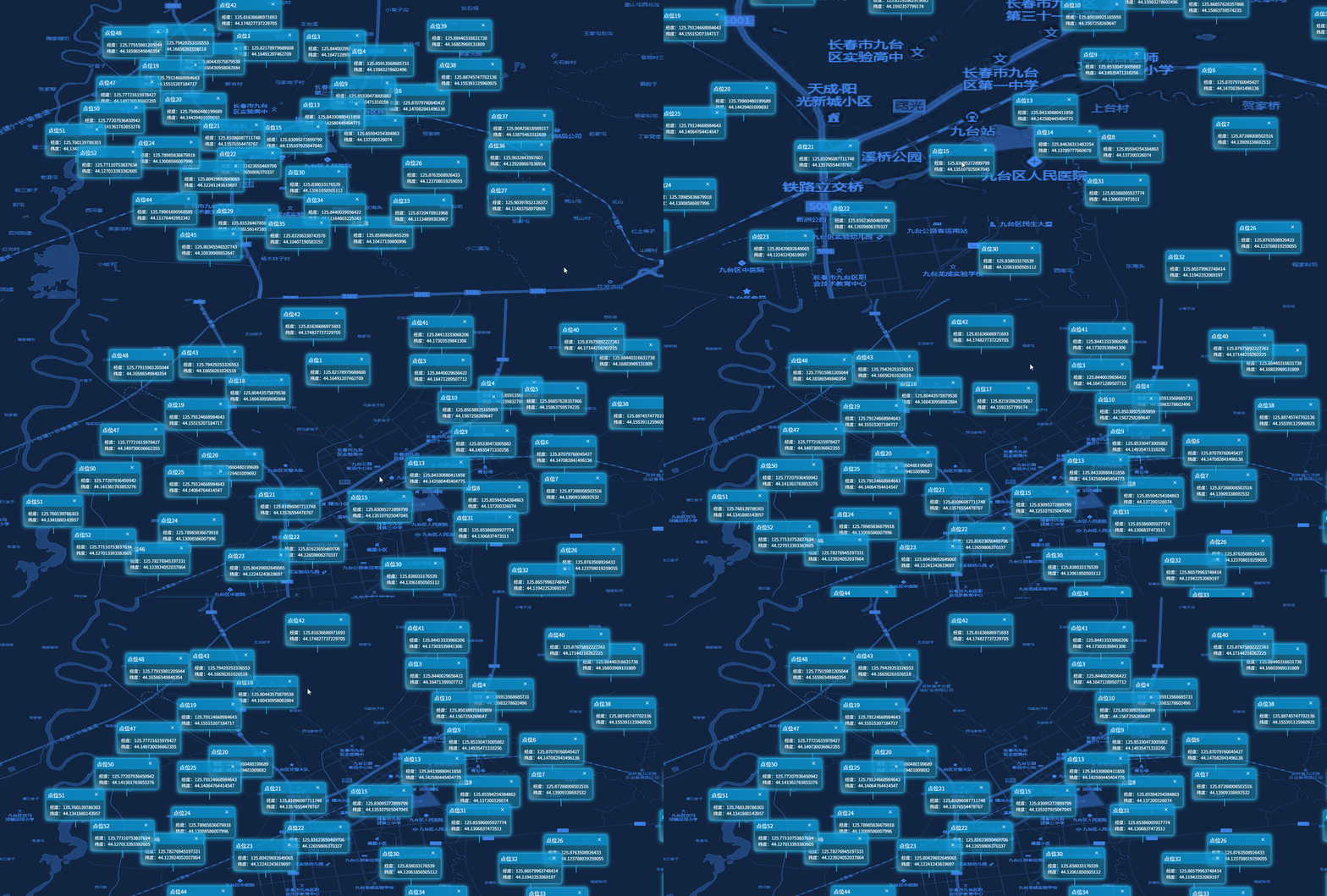
效果预览:
构造函数
new BubbleLayer(viewer, option)
| 参数 | 类型 | 描述 |
|---|---|---|
| viewer | object | Cesium Viewer 实例 |
| option | object | 全局默认配置项 |
option 参数说明
| 参数 | 类型 | 默认值 | 描述 |
|---|---|---|---|
| className | string | 'bx-popup-ctn0' | 全局默认 CSS 类名 参考 |
| html | function | null | 自定义 HTML 生成函数 (header, body) => string 参考 |
| collisionThreshold | number | 0.3 | 碰撞阈值(0-1),当重叠面积超过该比例时隐藏弹窗 |
方法说明
setData(data)
- 参数:
data(Array) - 包含位置和内容的数组。 - 描述:清空当前所有弹窗并重新批量加载。
addLayer(conf)
- 参数:
conf(Object) - 单个弹窗配置。geometry:coordinates(经纬度数组[lon, lat])。content: 包含header和body的对象。isclose:boolean,是否显示关闭按钮。
- 返回值:
Object- 包含id,element(DOM),updateContent(控制内容更新)。 - 描述:在指定位置创建一个 HTML 弹窗。
updateContent(id, content)
- 参数:
id(string),content(Object) - 描述:更新指定 ID 弹窗的内容。
content对象通常包含header和body字段。
setPopupVisible(id, visible)
- 参数:
id(string),visible(boolean) - 描述:切换单个弹窗的可见性。
setAllVisible(visible)
- 描述:全局切换所有弹窗的可见性。
show() / hide()
- 描述:快捷方法,显示或隐藏所有弹窗。
close(id)
- 参数:
id(string) - 描述:移除指定 ID 的弹窗及其 DOM 元素。
clearLayer()
- 描述:移除图层管理的所有弹窗,并清理
onTick事件监听。
setCollisionThreshold(val)
- 参数:
val(number) - 描述:动态更新碰撞检测的阈值(0-1)。
destroy()
- 描述:完全销毁图层并清理资源。
默认图层dom模板
html
    `
    ${isClose ? `<div class="bx-popup-close">×</div>` : ''}
    <div class="divpoint-wrap">
        <div class="divpoint-border">
            <div class="divpoint-center">
                <div class="bx-popup-header-ctn">${header}</div>
                <div class="bx-popup-content-ctn">
                    <div class="bx-popup-content">${body}</div>
                </div>
            </div>
        </div>
    <div class="directional"></div>
    `
模板默认样式
css
/*蓝色系*/
.bx-popup-ctn0 {
    position: absolute;
    color: #fff;
    margin: -48px 0 0;
    /*margin: 0 0 0 0;*/
    transform: translate(-50%, -100%);
    pointer-events: none;
    font-size: 12px;
}

.bx-popup-ctn0 .divpoint-wrap {
    padding: 0;
    width: max-content;
    pointer-events: none;
}

.bx-popup-ctn0 .divpoint-center {
    background: linear-gradient(45deg, #4f869d, rgba(18, 93, 120, .65), 40%, rgba(30, 127, 162, .65));
    border: 1px solid #40aee2;
    border-radius: 5px;
    box-shadow: 0 0 10px 2px #29baf1;
    pointer-events: none;
}

.bx-popup-ctn0 .bx-popup-tip {
    width: 17px;
    background: #fff;
    height: 17px;
    padding: 1px;
    margin: -10px auto 0;
    -webkit-transform: rotate(45deg);
    -moz-transform: rotate(45deg);
    -ms-transform: rotate(45deg);
    transform: rotate(45deg);
    pointer-events: none;
}

.bx-popup-ctn0 .bx-popup-header-ctn {
    background: rgba(0, 173, 255, .49);
    color: #fff;
    font-size: 15px;
    padding: 4px;
    pointer-events: none;
}

.bx-popup-ctn0 .bx-popup-close {
    position: absolute;
    top: 4px;
    right: 2px;
    width: 26px;
    height: 26px;
    cursor: pointer;
    pointer-events: all;
}

.bx-popup-ctn0 .bx-popup-content-ctn {
    padding: 10px;
    pointer-events: none;
}

.bx-popup-ctn0 .directional {
    bottom: 0;
    left: 0;
    width: 2px;
    height: 20px;
    background-color: #28bbf0;
    transform: none;
    margin: 0 0 0px 50%;
    pointer-events: none;
}

.bx-popup-ctn0 .divpoint-border {
    transition: .3s ease-in;
    background: linear-gradient(0, #8cdee5 2px, #8cdee5 0) no-repeat, linear-gradient(-90deg, #8cdee5 2px, #8cdee5 0) no-repeat, linear-gradient(-180deg, #8cdee5 2px, #8cdee5 0) no-repeat, linear-gradient(-270deg, #8cdee5 2px, #8cdee5 0) no-repeat;
    background-size: 0 2px, 2px 0, 0 2px, 2px 0;
    background-position: 0 0, 100% 0, 100% 100%, 0 100%;
    pointer-events: none;
}
使用示例
js
import { MapLayers } from "@/components/BMapViewer/b-map-viewer.js";

// 1. 初始化图层
const popupLayer = new MapLayers.BubbleLayer(viewer, {
    className: 'custom-popup-style'
});

// 2. 加载单个弹窗
popupLayer.addLayer({
    geometry: { coordinates: [116.40, 39.90] },
    content: {
        header: '实时监控',
        body: '<p>设备状态:正常</p>'
    },
    isClose: true // 开启关闭按钮
});

// 3. 批量加载
popupLayer.setData([
    {
        geometry: { coordinates: [116.41, 39.91] },
        content: { header: '点位 A', body: '数据 A' }
    }
]);
实现细节
- DOM 同步:图层通过
viewer.clock.onTick监听三维场景变化,使用Cesium.SceneTransforms.wgs84ToWindowCoordinates将地理坐标实时转换为屏幕像素坐标,并更新 DOM 的left/top。 - 内置碰撞检测:为了避免弹窗相互重叠遮挡,图层内置了碰撞检测逻辑。当两个弹窗的重叠面积比例超过 0.3 时,会自动隐藏其中一个,确保界面整洁。
- 自定义模板:可以通过构造函数传入
html回调函数来完全控制弹窗的 HTML 结构。